Тайлбар байхгүй

yjh0410 8b0452884d update 2 жил өмнө
config 8b0452884d update 2 жил өмнө
dataset 8b0452884d update 2 жил өмнө
evaluator 8b0452884d update 2 жил өмнө
img_files 35e59a6b2a update README 2 жил өмнө
models 8f4509bd61 modify YOLOX 2 жил өмнө
tools 7cf531e7da add Tracking 2 жил өмнө
utils c28c0761fa train YOLOv5-M 2 жил өмнө
.gitignore ef7614c2de add ignore file 2 жил өмнө
LICENSE fb1008d647 add MIT LICENSE 2 жил өмнө
README.md b3012f32ba release YOLOv5-M 2 жил өмнө
README_CN.md 35566901cf release YOLOv5-M 2 жил өмнө
demo.py 8b0452884d update 2 жил өмнө
engine.py 0744feec35 add YOLOv7-Plus 2 жил өмнө
eval.py 8b0452884d update 2 жил өмнө
requirements.txt 8c1d66b78f update README 2 жил өмнө
test.py 8b0452884d update 2 жил өмнө
track.py 8c1d66b78f update README 2 жил өмнө
train.py 8b0452884d update 2 жил өмнө
train.sh 8f4509bd61 modify YOLOX 2 жил өмнө
train_ddp.sh e8d1a88a7f update train_ddp.sh 2 жил өмнө

README.md

PyTorch_YOLO_Tutorial

YOLO Tutorial

English | 简体中文

Introduction

Here is the source code for an introduction to YOLO. We adopted the core concepts of YOLOv1~v4, YOLOX and YOLOv7 for this project and made the necessary adjustments. By learning how to construct the well-known YOLO detector, we hope that newcomers can enter the field of object detection without any difficulty.

Book: The technical books that go along with this project's code is being reviewed, please be patient.

Requirements

  • We recommend you to use Anaconda to create a conda environment:

    conda create -n yolo python=3.6
    
  • Then, activate the environment:

    conda activate yolo
    
  • Requirements:

    pip install -r requirements.txt 
    

My environment:

  • PyTorch = 1.9.1
  • Torchvision = 0.10.1

At least, please make sure your torch is version 1.x.

Training Configuration

Configuration
Per GPU Batch Size 16
Init Lr 0.01
Warmup Scheduler Linear
Lr Scheduler Linear
Optimizer SGD
Multi Scale Train True (320 ~ 640)

Due to my limited computing resources, I can not use a larger multi-scale range, such as 320-960.

Experiments

VOC

  • Download VOC.

    cd <PyTorch_YOLO_Tutorial>
    cd dataset/scripts/
    sh VOC2007.sh
    sh VOC2012.sh
    
  • Check VOC

    cd <PyTorch_YOLO_Tutorial>
    python dataset/voc.py
    
  • Train on VOC

For example:

python train.py --cuda -d voc --root path/to/VOCdevkit -m yolov1 -bs 16 --max_epoch 150 --wp_epoch 1 --eval_epoch 10 --fp16 --ema --multi_scale

All models are trained with ImageNet pretrained weight (IP). All FLOPs are measured with a 640x640 image size on VOC2007 test. The FPS is measured with batch size 1 on 3090 GPU from the model inference to the NMS operation.

COCO

  • Download COCO.

    cd <PyTorch_YOLO_Tutorial>
    cd dataset/scripts/
    sh COCO2017.sh
    
  • Check COCO

    cd <PyTorch_YOLO_Tutorial>
    python dataset/coco.py
    
  • Train on COCO

For example:

python train.py --cuda -d coco --root path/to/COCO -m yolov1 -bs 16 --max_epoch 150 --wp_epoch 1 --eval_epoch 10 --fp16 --ema --multi_scale

Due to my limited computing resources, I had to set the batch size to 16 or even smaller during training. I found that for small models such as *-Nano or *-Tiny, their performance seems less sensitive to batch size, such as the YOLOv5-N and S I reproduced, which are even slightly stronger than the official YOLOv5-N and S. However, for large models such as *-Large, their performance is significantly lower than the official performance, which seems to indicate that the large model is more sensitive to batch size.

I have provided a bash file train_ddp.sh that enables DDP training. I hope someone could use more GPUs to train the large models with a larger batch size, such as YOLOv5-L, YOLOX, and YOLOv7-L. If the performance trained with a larger batch size is higher, I would be grateful if you could share the trained model with me.

  • Redesigned YOLOv1~v2:
Model Backbone Scale IP Epoch APval
0.5
FPS3090
FP32-bs1
Weight
YOLOv1 ResNet-18 640 150 76.7 ckpt
YOLOv2 DarkNet-19 640 150 79.8 ckpt
YOLOv3 DarkNet-53 640 150 82.0 ckpt
YOLOv4 CSPDarkNet-53 640 150 83.6 ckpt
YOLOX-L CSPDarkNet-L 640 150 84.6 ckpt
YOLOv7-Large ELANNet-Large 640 150 86.0 ckpt
  • YOLOv3:
Model Backbone Scale Epoch APval
0.5:0.95
APval
0.5
FLOPs
(G)
Params
(M)
Weight
YOLOv1 ResNet-18 640 150 27.9 47.5 37.8 21.3 ckpt
YOLOv2 DarkNet-19 640 150 32.7 50.9 53.9 30.9 ckpt
  • YOLOv4:
Model Backbone Scale Epoch APval
0.5:0.95
APval
0.5
FLOPs
(G)
Params
(M)
Weight
YOLOv3-Tiny DarkNet-Tiny 640 250 25.4 43.4 7.0 2.3 ckpt
YOLOv3 DarkNet-53 640 250 42.9 63.5 167.4 54.9 ckpt
  • YOLOv5:
Model Backbone Scale Epoch APval
0.5:0.95
APval
0.5
FLOPs
(G)
Params
(M)
Weight
YOLOv4-Tiny CSPDarkNet-Tiny 640 250 31.0 49.1 8.1 2.9 ckpt
YOLOv4 CSPDarkNet-53 640 250 46.6 65.8 162.7 61.5 ckpt

*For YOLOv5-M and YOLOv5-L, increasing the batch size may improve performance. Due to my computing resources, I can only set the batch size to 16.*

  • YOLOX:
Model Backbone Scale Epoch APval
0.5:0.95
APval
0.5
FLOPs
(G)
Params
(M)
Weight
YOLOv5-N CSPDarkNet-N 640 250 29.8 47.1 7.7 2.4 ckpt
YOLOv5-S CSPDarkNet-S 640 250 37.8 56.5 27.1 9.0 ckpt
YOLOv5-M CSPDarkNet-M 640 250 43.5 62.5 74.3 25.4 ckpt
YOLOv5-L CSPDarkNet-L 640 250 46.7 65.5 155.6 54.2 ckpt

*For YOLOX-M and YOLOX-L, increasing the batch size may improve performance. Due to my computing resources, I can only set the batch size to 16.*

  • YOLOv7:
Model Backbone Scale Epoch APval
0.5:0.95
APval
0.5
FLOPs
(G)
Params
(M)
Weight
YOLOX-N CSPDarkNet-N 640 300 7.5 2.3
YOLOX-S CSPDarkNet-S 640 300 27.1 9.0
YOLOX-M CSPDarkNet-M 640 300 74.3 25.4
YOLOX-L CSPDarkNet-L 640 300 155.4 54.2

While YOLOv7 incorporates several technical details, such as anchor box, SimOTA, AuxiliaryHead, and RepConv, I found it too challenging to fully reproduce. Instead, I created a simpler version of YOLOv7 using an anchor-free structure and SimOTA. As a result, my reproduction had poor performance due to the absence of the other technical details. However, since it was only intended as a tutorial, I am not too concerned about this gap.

Necessary instructions:

  • All models are trained with ImageNet pretrained weight (IP). All FLOPs are measured with a 640x640 image size on COCO val2017. The FPS is measured with batch size 1 on 3090 GPU from the model inference to the NMS operation.

  • *The reproduced YOLOv5's head is the Decoupled Head, which is why the FLOPs and Params are higher than the official YOLOv5. Due to my limited computing resources, I can not align the training configuration with the official YOLOv5, so I cannot fully replicate the official performance. The YOLOv5 I reproduce is for learning purposes only.*

  • Due to my limited computing resources, I had to abandon training on other YOLO detectors, including YOLOv7-Huge and YOLOv8-Nano~Large. If you are interested in these models and have trained them using the code from this project, I would greatly appreciate it if you could share the trained weight files with me.

  • Using a larger batch size may improve the performance of large models, such as YOLOv5-L, YOLOX-L and YOLOv7-L. Due to my computing resources, I can only set the batch size to 16.

Train

Single GPU

sh train.sh

You can change the configurations of train.sh, according to your own situation.

You also can add --vis_tgt to check the images and targets during the training stage. For example:

python train.py --cuda -d coco --root path/to/coco -m yolov1 --vis_tgt

Multi GPUs

sh train_ddp.sh

You can change the configurations of train_ddp.sh, according to your own situation.

In the event of a training interruption, you can pass --resume the latest training weight path (None by default) to resume training. For example:

python train.py \
        --cuda \
        -d coco \
        -m yolov1 \
        -bs 16 \
        --max_epoch 300 \
        --wp_epoch 3 \
        --eval_epoch 10 \
        --ema \
        --fp16 \
        --resume weights/coco/yolov1/yolov1_epoch_151_39.24.pth

Then, training will continue from 151 epoch.

Test

python test.py -d coco \
               --cuda \
               -m yolov1 \
               --img_size 640 \
               --weight path/to/weight \
               --root path/to/dataset/ \
               --show

For YOLOv7, since it uses the RepConv in PaFPN, you can add --fuse_repconv to fuse the RepConv block.

python test.py -d coco \
               --cuda \
               -m yolov7_large \
               --fuse_repconv \
               --img_size 640 \
               --weight path/to/weight \
               --root path/to/dataset/ \
               --show

Evaluation

python eval.py -d coco-val \
               --cuda \
               -m yolov1 \
               --img_size 640 \
               --weight path/to/weight \
               --root path/to/dataset/ \
               --show

Demo

I have provide some images in data/demo/images/, so you can run following command to run a demo:

python demo.py --mode image \
               --path_to_img data/demo/images/ \
               --cuda \
               --img_size 640 \
               -m yolov2 \
               --weight path/to/weight \
               --show

If you want run a demo of streaming video detection, you need to set --mode to video, and give the path to video --path_to_vid

python demo.py --mode video \
               --path_to_vid data/demo/videos/your_video \
               --cuda \
               --img_size 640 \
               -m yolov2 \
               --weight path/to/weight \
               --show \
               --gif

If you want run video detection with your camera, you need to set --mode to camera

python demo.py --mode camera \
               --cuda \
               --img_size 640 \
               -m yolov2 \
               --weight path/to/weight \
               --show \
               --gif

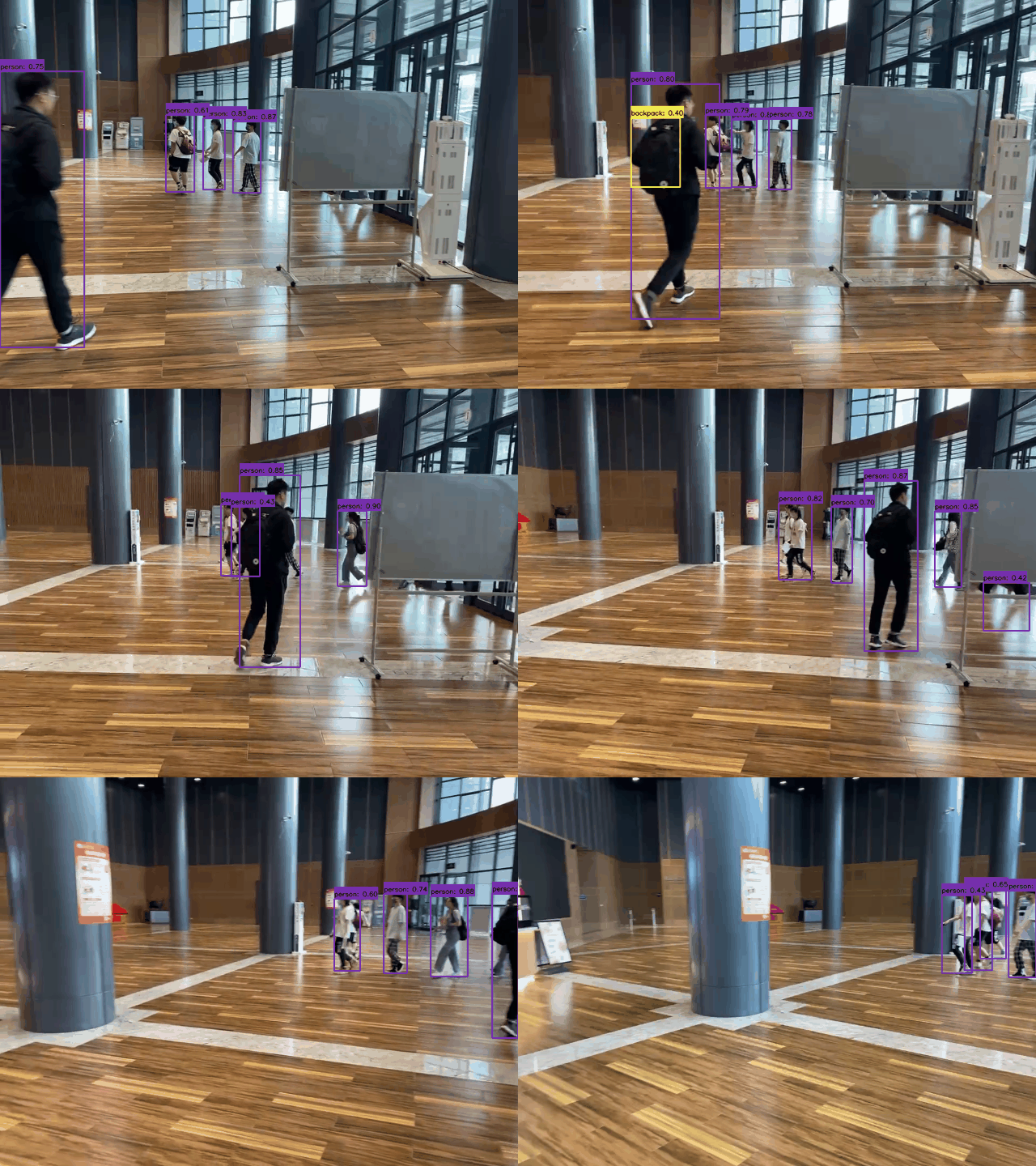
Detection visualization

  • Detector: YOLOv2

Command:

python demo.py --mode video \
                --path_to_vid ./dataset/demo/videos/000006.mp4 \
               --cuda \
               --img_size 640 \
               -m yolov2 \
               --weight path/to/weight \
               --show \
               --gif

Results:

image

Tracking

Our project also supports multi-object tracking tasks. We use the YOLO of this project as the detector, following the "tracking-by-detection" framework, and use the simple and efficient ByteTrack as the tracker.

  • images tracking

    python track.py --mode image \
                --path_to_img path/to/images/ \
                --cuda \
                -size 640 \
                -dt yolov2 \
                -tk byte_tracker \
                --weight path/to/coco_pretrained/ \
                --show \
                --gif
    
  • video tracking

    python track.py --mode video \
                --path_to_img path/to/video/ \
                --cuda \
                -size 640 \
                -dt yolov2 \
                -tk byte_tracker \
                --weight path/to/coco_pretrained/ \
                --show \
                --gif
    
  • camera tracking

    python track.py --mode camera \
                --cuda \
                -size 640 \
                -dt yolov2 \
                -tk byte_tracker \
                --weight path/to/coco_pretrained/ \
                --show \
                --gif
    

Tracking visualization

  • Detector: YOLOv2
  • Tracker: ByteTracker
  • Device: i5-12500H CPU

Command:

python track.py --mode video \
                --path_to_img ./dataset/demo/videos/000006.mp4 \
                -size 640 \
                -dt yolov2 \
                -tk byte_tracker \
                --weight path/to/coco_pretrained/ \
                --show \
                --gif

Results:

image

Model Backbone Scale Epoch APval
0.5:0.95
APval
0.5
FLOPs
(G)
Params
(M)
Weight
YOLOv7-T ELANNet-Tiny 640 300 38.0 56.8 22.6 7.9 ckpt
YOLOv7-L ELANNet-Large 640 300 48.0 67.5 144.6 44.0 ckpt